Changes in SharePoint Authentication with Dynamics 365 Finance Update 10.0.40
With the release of Dynamics 365 Finance version 10.0.40, significant changes have been introduced to the SharePoint authentication mechanism. These updates will impact any integration with SharePoint that relies on the previous authentication model. If you use SharePoint APIs within Dynamics 365, you must prepare for these changes before they become mandatory with version 10.0.42. Here’s a breakdown of what you need to know.
Key Changes in SharePoint Authentication #
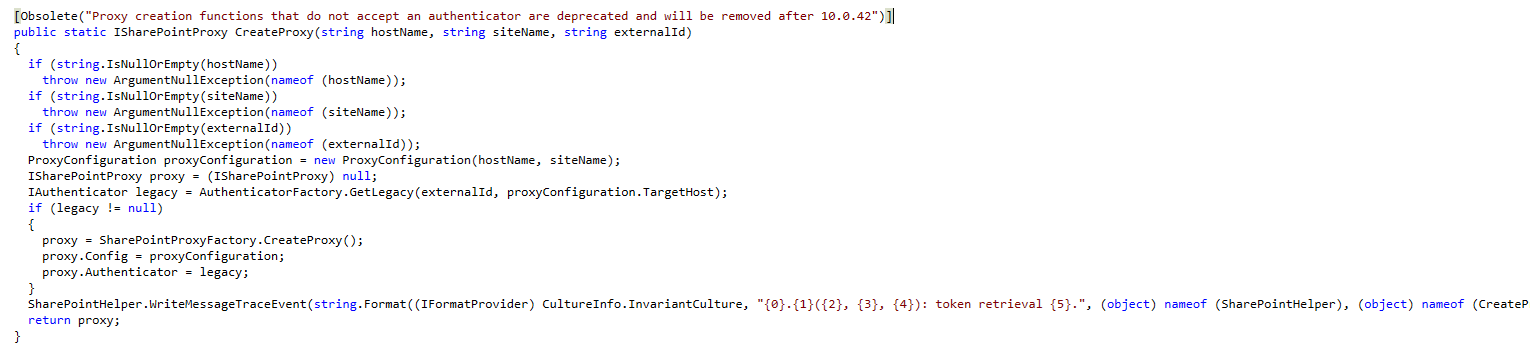 Decompilation of Microsoft.Dynamics.Platform.Integration.SharePoint.dll / SharePointHelper
-
Deprecation of Existing SharePoint Authentication
The authentication mechanism previously used for integrating with SharePoint is being removed. As of version 10.0.40, the new SharePoint user authentication feature is available but optional. However, it will become mandatory starting with version 10.0.42. -
Migration Deadline
By February 28, 2025, you must migrate to the new SharePoint authentication model. After this date, the current SharePoint connection method will stop working entirely. -
Impact on Token Generation via SharePoint Proxy
TheSharePointHelper::createProxymethod, which was previously used to obtain a SharePoint proxy with an access token, is now deprecated and marked for removal by version 10.0.42. Calling this method:SharePointHelper::createProxy( docuParameters.DefaultSharePointServer, '/', xUserInfo::getCurrentUserExternalId() );will no longer return a proxy with an access token. Although the access token might still appear when debugging (via the
LegacyTokenAuthenticator), this class is now internal, making it inaccessible for external use.
One Time registration process #
According to Microsoft, you should execute this script to allow application access to SharePoint after 10.0.40 for non interactive sessions. Microsoft Learn: Configure document management | One-time registration process
Import-Module Microsoft.Graph

# The parameter for TenantId needs to be changed
Connect-MgGraph -TenantId microsoft.onmicrosoft.com -Scopes 'Application.ReadWrite.All'

# These AppIds do not change as they are the first party application IDs
$erpServicePrincipal = Get-MgServicePrincipal -Filter "AppId eq '00000015-0000-0000-c000-000000000000'"
$sharePointServicePrincipal = Get-MgServicePrincipal -Filter "AppId eq '00000003-0000-0ff1-ce00-000000000000'"
$spAppRole = $sharePointServicePrincipal.AppRoles | where {$_.Value -eq 'Sites.ReadWrite.All'}

# Assign the SharePoint 'Sites.ReadWrite.All' permission to the Microsoft Dynamics 365 finance and operations application
New-MgServicePrincipalAppRoleAssignedTo -ServicePrincipalId $erpServicePrincipal.Id -PrincipalId $erpServicePrincipal.Id -ResourceId $sharePointServicePrincipal.Id -AppRoleId $spAppRole.Id
What Can Be Used Instead? #
Temporary Solution: SharePointTokenFactory #
For those encountering 401 Unauthorized errors in SharePoint API calls, the following method can be used to obtain an access token:
   using Microsoft.Dynamics.Platform.Integration.SharePoint;

   SharePointTokenFactory::GetToken(userId, domain);
This approach provides a bearer token that can authenticate SharePoint API requests. However, be cautious: while this method is currently not marked as deprecated, there’s no guarantee it will remain available in future updates. It is strongly recommended to monitor updates from Microsoft for any changes.
Long-Term Solution: Entra ID App Registration #
To future-proof your integration, consider creating an app registration in Microsoft Entra ID (formerly Azure Active Directory). Using this approach, you can generate your own access tokens with either:
- Client and secret authentication, or
- Certificate-based authentication.
This ensures compliance with Microsoft’s recommended practices and prepares your system for any further changes in authentication models.
Next Steps #
- Audit Your Current Integrations: Check where
SharePointHelper::createProxyor similar methods are being used and plan for their removal. - Implement Token Generation: Use
SharePointTokenFactory::GetTokenas a short-term workaround while transitioning to app registration. - Prepare for Mandatory Updates: Begin configuring app registrations in Entra ID to handle token-based authentication.
The upcoming updates underscore the importance of aligning with Microsoft’s evolving security protocols. By taking proactive steps now, you can ensure uninterrupted integration with SharePoint and avoid disruptions when the current authentication model is retired.
Useful Resources #
- Microsoft Documentation: Registering an App in Entra ID
- Dynamics 365 Finance and Operations Release Notes
Got questions or need further clarification? Drop a comment below